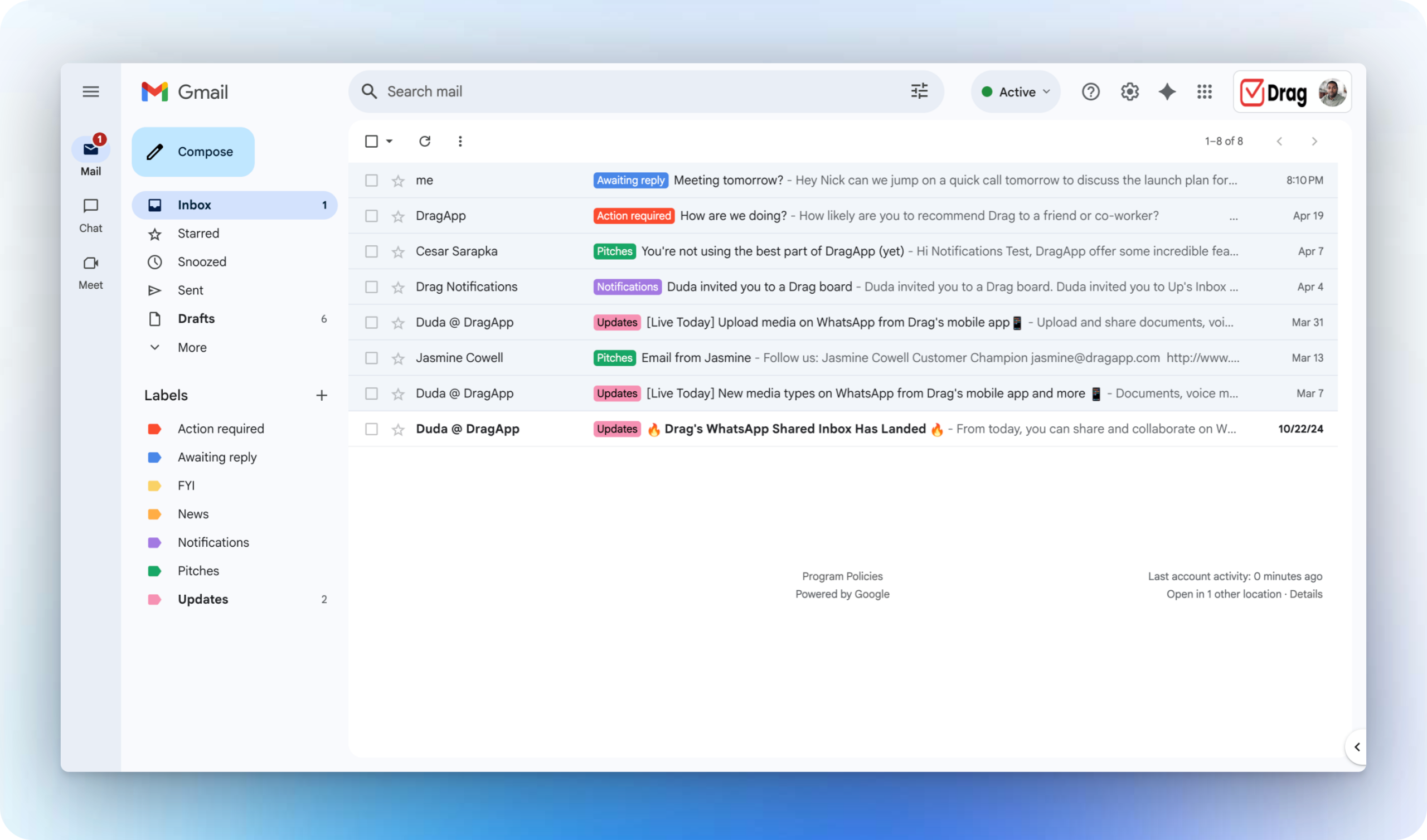
HeyHelp is an AI email assistant built specifically for Gmail that sorts, tags, and drafts messages in your own voice, offering a freemium tier and paid plans ranging from $18 to $36 per month. Classified as a Tier 2 CRE-Adjacent tool in the BestCRE Master Database, this application targets the universal problem of inbox management rather than commercial real estate specific workflows. For brokers managing hundreds of daily inquiries, property managers fielding tenant requests, or analysts coordinating with lenders, the inbox remains the primary operating system. HeyHelp addresses this by applying generative AI directly to the Gmail interface to categorize incoming messages and propose context-aware replies.
While competitors in the CRE AI Assistants & Copilots category like Agentforce (scored 88) or Conduit (scored 87) focus on enterprise data orchestration or complex agentic workflows, HeyHelp occupies a much narrower, highly practical niche. Our analysis indicates that its value proposition centers entirely on saving time spent on repetitive email triage. Because it lacks native integrations with property management software or commercial real estate databases, it cannot verify rent rolls or pull lease expirations automatically. Instead, it learns your writing style from past emails to generate drafts that sound authentic. For commercial real estate professionals evaluating software investments in August 2026, HeyHelp represents a low-friction, low-cost utility rather than a comprehensive operational platform.
What HeyHelp does and how it works
HeyHelp operates as an overlay within the Gmail environment, functioning primarily as an intelligent filter and drafting engine. When a commercial real estate professional receives an email—whether it is a tour request from a tenant rep broker or a maintenance complaint from a retail tenant—the software reads the incoming text and applies automated tags based on content and urgency. This sorting mechanism moves beyond standard Gmail filters by using natural language processing to understand the intent behind the message, grouping similar inquiries together so users can process them in batches rather than chronologically.
The core mechanical feature is its drafting capability, which analyzes your historical sent folder to mimic your specific tone, vocabulary, and phrasing. When you open an email, HeyHelp presents a suggested reply before you begin typing. If a broker typically responds to low-probability leads with a polite but brief template, the AI will generate a similar draft. Users can accept the draft with a single click, modify it, or reject it entirely. The system learns from these edits, theoretically improving its stylistic accuracy over time.
Our analysis shows that the tool is strictly confined to the email ecosystem. It does not read attached PDF offering memorandums, nor does it cross-reference sender domains with a CRM like Salesforce or Dealpath. The mechanics rely entirely on the text within the email thread itself. For a property manager, this means HeyHelp can draft a response acknowledging a plumbing issue, but the manager must still manually enter that work order into their property management system. It acts as an accelerator for communication, not a replacement for data entry or workflow execution.
9AI Framework: the score, dimension by dimension
CRE Relevance: 4/10
HeyHelp is a general-purpose application with absolutely no commercial real estate specific data, models, or workflows built into its architecture. As a Tier 2 CRE-Adjacent tool, it solves a universal business problem—email overload—rather than a real estate problem. It does not understand capitalization rates, zoning codes, or lease clauses unless those terms are explicitly defined in the immediate email thread. Consequently, its utility for a commercial real estate professional is identical to its utility for a marketing executive or a software engineer. The system relies entirely on the user to provide the industry context. In practice: Expect a generic productivity utility that accelerates your inbox management but offers zero specialized knowledge regarding commercial real estate transactions or property operations.
Data Quality and Sources: 6/10
Because HeyHelp operates exclusively within Gmail, the quality of its output is entirely dependent on the quality of the data in your inbox and sent folder. The software does not pull from external commercial real estate databases, public records, or proprietary market reports. Its primary dataset is your own historical communication. If your past emails are well-written, professional, and consistent, the AI will mirror that quality. If your inbox is cluttered with fragmented replies or inconsistent terminology, the drafting engine will struggle to establish a reliable baseline voice. Our analysis indicates that the tool is highly literal and restricted to the text provided in the immediate conversation. In practice: The AI relies strictly on your personal email history, meaning it will only sound as professional and accurate as your previous correspondence.
Ease of Adoption: 9/10
Implementation of HeyHelp requires virtually no technical expertise, making it highly accessible for commercial real estate professionals who may not have dedicated IT support. The software installs directly into the Gmail interface, requiring standard OAuth permissions to read and write emails. There is no complex onboarding process, no data migration from legacy systems, and no need to train staff on a new standalone platform. Users simply activate the tool, and it immediately begins analyzing the inbox to sort messages and generate drafts. This plug-and-play nature contrasts sharply with complex enterprise deployments seen in other categories. However, this simplicity also means customization options are limited to basic tagging preferences. In practice: A broker or analyst can install the tool and begin using the core drafting and sorting features within five minutes.
Output Accuracy: 7/10
The drafting engine excels at matching tone and structure, but it requires careful supervision regarding factual accuracy. When responding to standard inquiries—such as acknowledging receipt of a letter of intent or confirming a property tour time—the generated text is highly reliable. However, our analysis reveals that the AI cannot verify commercial real estate specifics. If an email asks for the current asking rent on a specific suite, HeyHelp might hallucinate a number or draft a placeholder, as it cannot query your property management software. Users must diligently review every draft before hitting send to ensure financial figures, dates, and property details are correct. In practice: You must treat the software as a junior assistant whose math and property facts require strict manual verification before any message leaves your outbox.
Integration and Workflow Fit: 6/10
HeyHelp is entirely confined to the Google Workspace ecosystem, specifically Gmail. It does not offer native integrations with Microsoft Outlook, which remains the dominant email client for many institutional commercial real estate firms. Furthermore, it lacks connections to industry-standard platforms like Yardi, MRI, VTS, or Salesforce. When a broker receives an email that requires updating a CRM record or a property manager needs to log a tenant complaint into a ticketing system, HeyHelp provides no assistance. The tool operates in a silo, meaning users must still rely on manual data entry to keep their commercial real estate tech stack updated. In practice: If your firm operates on Microsoft 365 or requires email data to sync automatically with a specialized real estate CRM, this tool will not fit your infrastructure.
Pricing Transparency: 9/10
The vendor provides clear, publicly available pricing, which is a welcome departure from the opaque quoting practices common in commercial real estate software. HeyHelp operates on a freemium model, allowing users to test basic sorting and drafting functionalities at no cost. For professional use, the paid tiers range from $18 to $36 per month. This straightforward, per-user subscription model makes it easy for independent brokers or small property management teams to calculate their exact software expenditure without engaging a sales representative. There are no hidden implementation fees or mandatory multi-year contracts, lowering the financial risk of adoption. In practice: Buyers can accurately forecast their annual costs directly from the website, with a maximum exposure of $432 per user annually for the highest tier.
Support and Reliability: 5/10
As an unproven startup in the crowded AI productivity space, HeyHelp carries inherent risks regarding long-term support and reliability. The company does not publish service level agreements (SLAs) or offer dedicated account managers for small teams. Support is primarily handled through self-serve documentation and asynchronous email tickets. While the simplicity of the Gmail extension means fewer technical things can break, any changes to Google’s API policies could temporarily disrupt the service. Furthermore, the vendor lacks the established support infrastructure of mature commercial real estate software providers. Buyers should not expect 24/7 phone support or custom engineering assistance. In practice: Users must be comfortable relying on basic email support and self-help articles, accepting the operational risks associated with a young, venture-backed startup.
Innovation and Roadmap: 6/10
The development trajectory for HeyHelp appears focused strictly on general email productivity rather than commercial real estate functionality. While tools like Cursor or Agentforce are rapidly expanding their ability to handle complex, multi-step workflows, HeyHelp is iterating on basic inbox triage. Our analysis suggests future updates will likely include better multi-language support, refined tone adjustments, and perhaps deeper integration with Google Calendar or Google Drive. However, buyers should not expect the vendor to introduce features tailored to lease analysis, property marketing, or rent roll extraction. The roadmap is dictated by the needs of a mass-market audience, not the specialized requirements of property professionals. In practice: You are purchasing the tool for its current email drafting capabilities, with no expectation that it will evolve into a real estate specific platform.
Market Reputation: 5/10
HeyHelp is a relatively new entrant in the broader AI assistant category and has not yet established a significant footprint within the commercial real estate sector. Unlike Replit or Gumloop, which have built strong communities among technical users, HeyHelp is still building its brand identity. Reviews in general software directories indicate satisfaction with its core drafting features, but there are no published case studies featuring commercial brokerages or institutional landlords. As a Tier 2 CRE-Adjacent tool, it lacks the industry specific credibility of purpose-built real estate applications. The company is unproven regarding its ability to scale and maintain enterprise-grade security standards required by top-tier brokerages. In practice: The vendor is an unknown entity in commercial real estate, requiring buyers to evaluate the tool entirely on its standalone technical merits rather than industry pedigree.
Who should use HeyHelp
HeyHelp is best suited for high-volume communicators who spend hours daily managing a crowded Gmail inbox and rely heavily on repetitive responses.
- Independent Tenant Rep Brokers: Professionals fielding dozens of similar inquiries daily who need to quickly dispatch standard property details or tour confirmations.
- Boutique Property Managers: Managers receiving high volumes of routine tenant emails who want to draft polite, consistent responses without typing each from scratch.
- Marketing Coordinators: Staff handling inbound general inquiries from brokerage websites who need to categorize leads and send templated initial replies.
- Solo Analysts: Individuals working independently who want to accelerate their email workflow to free up time for actual financial underwriting.
Who should look elsewhere
This tool is entirely inappropriate for enterprise teams requiring deep integration with specialized commercial real estate databases or those operating outside the Google ecosystem.
- Microsoft Outlook Users: Firms standardized on Microsoft 365, as the tool currently only functions within Gmail.
- Institutional Investment Sales Teams: Groups that require email correspondence to automatically sync with complex CRM platforms like Salesforce or Dealpath.
- Lease Administrators: Professionals who need AI to extract clauses or financial data from attached PDF documents, which this tool cannot do.
- Enterprise IT Departments: Teams requiring strict, centralized control over AI data processing, custom SLAs, and dedicated vendor support.
Pricing and ROI
HeyHelp offers highly transparent pricing, operating on a freemium model with paid tiers ranging from $18 to $36 per user per month. The free tier allows users to test the basic sorting and limited drafting capabilities, making it easy to evaluate the software before committing capital. The $18 per month tier unlocks unlimited AI drafting and advanced inbox tagging, while the $36 per month tier includes faster processing speeds and more nuanced tone matching based on a larger sample of your sent folder.
For a commercial real estate professional, the return on investment math is straightforward and highly favorable. At the maximum cost of $36 per month (or $432 annually), the software only needs to save a fraction of a billable hour each month to justify its expense. If a mid-level broker valuing their time at $200 per hour saves just 15 minutes a week by using the AI to draft routine responses to tour requests or broker blasts, the tool generates approximately $2,600 in recovered time value annually. Our analysis indicates that while the tool does not generate direct revenue, the low cost of entry makes the productivity gains highly accretive for any professional suffering from severe email overload.
Integration and CRE tech stack fit
When evaluating integration fit within a standard commercial real estate technology stack, HeyHelp presents significant limitations. The application is strictly a Google Workspace extension, meaning it operates exclusively within Gmail. It offers zero native connectivity to industry-standard property management systems like Yardi, MRI, or RealPage. Furthermore, it does not integrate with commercial real estate CRMs such as Buildout, Apto, or Dealpath.
If a broker receives an email containing updated rent roll figures or a signed letter of intent, HeyHelp can help draft the reply, but it cannot automatically parse that data and push it into your underwriting models or CRM records. Users must continue to rely on manual data entry or secondary automation tools like Zapier to move information out of their inbox and into their core operating systems. For boutique firms running their entire business out of Google Workspace, this isolation is not a dealbreaker. However, for institutional teams requiring a unified data environment where email correspondence automatically updates property and client records, HeyHelp remains a disconnected, standalone utility.
Competitive landscape
In the BestCRE Master Database category of CRE AI Assistants & Copilots, HeyHelp occupies a distinct, albeit narrow, position. Unlike top-scoring tools such as Cursor (scored 90) or Replit (scored 88), which are designed for technical users building custom applications, HeyHelp is a pure end-user productivity application. It also contrasts sharply with agentic platforms like Agentforce (scored 88), Gumloop (scored 87), Manus (scored 87), and Conduit (scored 87). Those platforms focus on orchestrating complex, multi-step workflows—such as scraping property data, updating CRMs, and generating reports—whereas HeyHelp is strictly confined to sorting and drafting emails.
For commercial real estate professionals seeking email assistance, the true alternatives are other general-purpose communication tools. Microsoft Copilot is the primary competitor for firms operating on Microsoft 365, offering similar email drafting capabilities but with the added benefit of deep integration across Word, Excel, and Teams. Google’s own Gemini for Workspace provides native drafting within Gmail, which may render third-party extensions like HeyHelp redundant for users already paying for Google’s premium AI tier. Additionally, tools like Superhuman offer AI-assisted drafting combined with a completely overhauled email interface designed for speed. Our analysis suggests that while HeyHelp performs its specific niche well, buyers must weigh whether a dedicated email extension is necessary if they plan to adopt broader, suite-wide AI assistants from Google or Microsoft.
The bottom line
HeyHelp is a highly functional, low-cost utility that solves a very specific problem: Gmail inbox fatigue. It is not a commercial real estate platform, and it will not underwrite deals, extract lease data, or update your CRM. However, for independent brokers, boutique property managers, and analysts who spend hours daily buried in routine email correspondence, the $18 to $36 monthly investment is easily justified by the time saved on drafting mundane replies. Do not buy this tool expecting an intelligent real estate copilot. Buy it if you operate exclusively in Gmail and want a reliable digital assistant to mimic your writing style and accelerate your daily communication. If your firm uses Microsoft Outlook or requires deep integration with Yardi or Salesforce, you must look elsewhere. For Google Workspace users seeking immediate relief from email overload, HeyHelp is a practical, low-risk acquisition.
Frequently asked questions
Does HeyHelp integrate with Yardi or MRI?
No. HeyHelp is strictly a Gmail extension and does not offer native integrations with any commercial real estate property management systems or specialized CRMs.
Can the AI read attached offering memorandums?
No. The tool only analyzes the text within the body of the email thread to generate drafts and apply sorting tags. It does not parse PDF attachments.
Is HeyHelp available for Microsoft Outlook?
Not at this time. The software is built exclusively for the Google Workspace ecosystem and only functions within the Gmail interface.
How does the AI learn my writing style?
The software analyzes your historical sent folder within Gmail to understand your vocabulary, tone, and typical phrasing, allowing it to generate drafts that sound like you.
What happens if the AI drafts incorrect property details?
You must manually review and edit every draft before sending. The AI cannot verify facts, so it may hallucinate rent prices or square footage if not explicitly stated in the thread.
Are there long-term contracts required?
No. HeyHelp operates on a month-to-month subscription model with published pricing ranging from $18 to $36 per user, alongside a basic freemium tier.


